Nicolium v0.2.0 has been released! This release is focused on interface customization features, but there are also some other improvements worth mentioning. Here are the highlights:
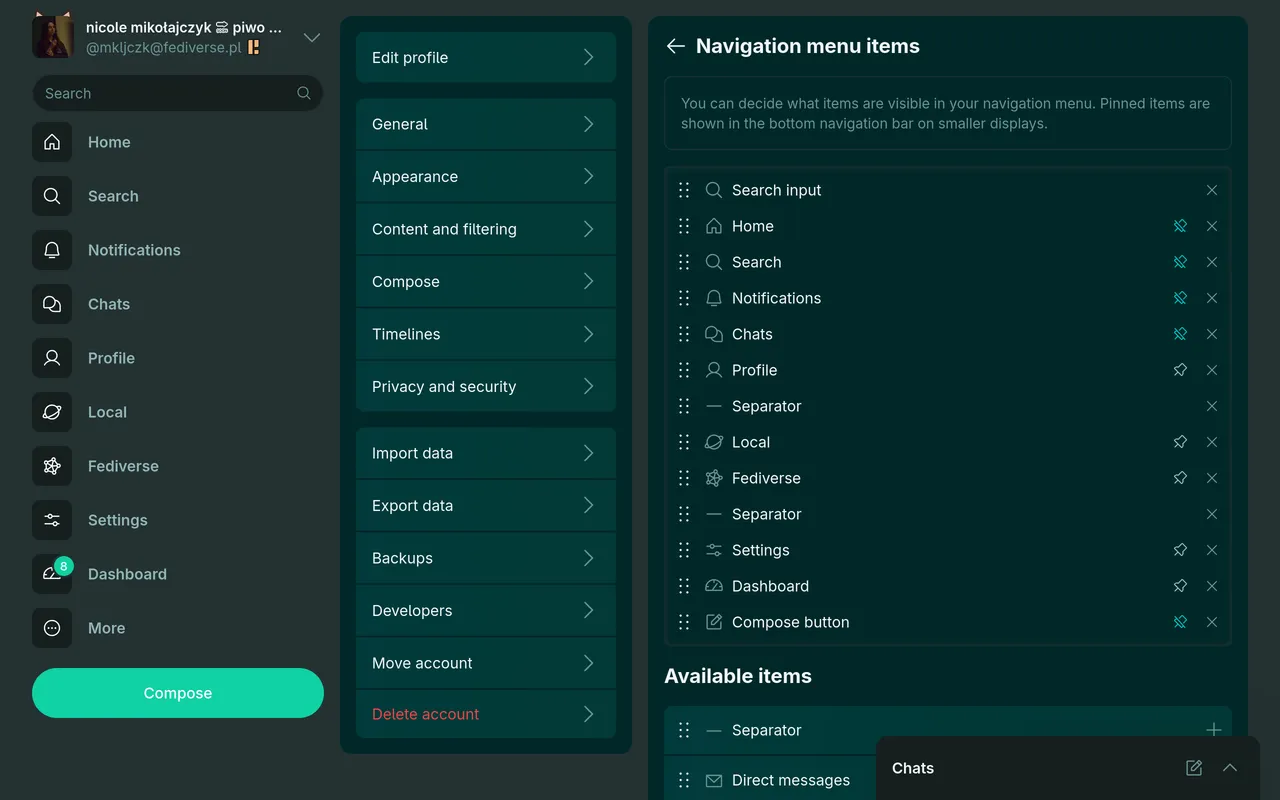
Sidebar, navigation menu and status actions customization
It is now possible to fully customize the content of Nicolium sidebar, navigation menu (left sidebar in desktop layout, bottom navigation and hamburger menu in mobile layout) and status actions (buttons that appear below the status content). It allows placing additional items, such as adding translate or bookmark buttons to status actions putting recent notifications in the sidebar or adding a profile link to the bottom navigation menu (it’s displayed as the user avatar). I tried to make the changes adapt to the existing design well, so you can try stuff like removing all items from status action bar or unpinning navigation menu items.
Reorganized settings
The settings page has been reorganized and split into several categories, such as Appearance, Content and filtering, Timelines and Privacy and security. I want to keep the settings easy to navigate.
Animation improvements
I tried to make the UI animations smoother and more consistent. While not copying the design of any other Fediverse client, I tried to make it feel similar to Misskey. I’m a big fan of some parts of Misskey UI and wanted to make Nicolium feel more like it.
Displaying avatars next to mentions
While not actually introduced in Nicolium v0.2.0, I want to mention one of the features introduced in the v0.1.2 patch release, which is an option to display user avatars next to their usernames in mentions. It’s a small change, but it makes it easier to quickly identify users in mentions.
Meta/developer experience
I added a Development Containers configuration that helps maintain a consistent development environment across different machines and makes it easier for new contributors to get started with development. I’m not experienced with that so it might not be the most optimal configuration, but it works for me.
I updated the contributing guidelines introducing a rule that forbids introducing first-party code generated by large language models. The AGENTS.md file references this rule, which helps developers used to agent-heavy workflow understand it’s against the project rules and mostly blocks the LLMs from making code changes, so they get like meow :3 sowwy but i can't assist you with that meow~ i can however help you with understanding the codebase :3. Also, the README file now includes avatars of the Nicolium sponsors from GitHub Sponsors.
Other changes
I’ll just paste the full changelog here:
Added
- Option to reorganize, add, or remove items in the sidebar, navigation menu and status action bar.
- Option to include custom CSS in instance configuration, either as a string or a stylesheet link.
- Option to disallow unauthenticated users from visiting remote content.
- Option to filter out posts containing media without alternative text.
- Option to display nested quotes.
- Boost scheduling on supported backends (Iceshrimp.NET).
- MFA support for Iceshrimp.NET.
- Pleroma instance configuration from the admin dashboard.
- Text wrap toggle button for code blocks in posts.
Changed
- Reorganized settings into categories.
- Option to disable the Chats pane in settings.
- Boost privacy can be set in a boost confirmation modal.
- Post translations can be displayed side-by-side with the original text.
- Longer profile bios are truncated with a “Show more” button.
- Link previews are displayed when the quoted post is not available.
- Advanced mode for filtering can be switched from the notifications page.
- Improved unavailable posts display on Pleroma, and unavailable parent post information on Akkoma.
- Improved display of followers count when partially hidden by the user.
- Updated feature definitions for snac2, NeoDB, and Iceshrimp.NET.
- Various changes to the UI animations.
- Continued work on migrating styles from TailwindCSS.
Fixed
- Nicolium no longer infinitely tries to load a timeline it’s not authorized to access.
- Scheduled posts with polls no longer crash.
- Media modal works on scheduled/drafted posts page.
- Ctrl+Enter hotkey for posting works in the subject field.
- Private boosts are marked as such again in timelines.
- Instance announcements management.
- Upload progress is now correctly displayed.
- Progress bar component state and animation.
- Sidebar active state is now handled more consistently.
- Dropdown menu overlay no longer blinks when opened on mobile.
- Improved back button behavior in columns.
- Avatars are correctly displayed next to usernames in MFM.
- Interaction circles can be displayed as HTML instead of canvas, fixing CORS-related issues.
Plans for Nicolium v1.0.0
In the previous release announcement, made on my personal blog because I didn’t feel like posting it here, I mentioned that the v1.0.0 release will introduce the TweetDeck-like multi-column layout with full multi-account support. However, I also announced that the next releases would improve customization options, which is what I focused on in v0.2.0. I will probably release v1.0.0 as soon as I remove the TailwindCSS dependency and ensure there are no major bugs. I continue to work on the multi-column layout, but I’m not sure if it will be ready for v1.0.0.
Try Nicolium
You can try Nicolium out by visiting web.nicolium.app and find the source code on Codeberg. If you’ve encountered any bugs or want to suggest a feature, you can open an issue on Codeberg. The documentation describes how to deploy Nicolium alongside your own Fediverse instance and how to start contributing. You can also join Nicolium IRC channel on libera.chat if you want to chat about it.